

Hotkeyz: Master Keyboard Shortcuts with Ease
Overview
Hotkeyz is a lightweight desktop utility designed to enhance productivity by enabling users to create and manage custom keyboard shortcuts for a wide range of tasks. The software allows users to launch applications, open files, control system functions like volume and shutdown, and automate repetitive actions—all through customizable key combinations. Its primary purpose is to reduce reliance on the mouse, offering a faster, more efficient workflow for power users and professionals who value speed and precision.
Targeted at individuals seeking to streamline their daily computer interactions, Hotkeyz is particularly useful for developers, content creators, and office workers who perform frequent, repetitive actions. The software operates in the background with minimal resource consumption, ensuring it does not interfere with system performance. Real-world usage scenarios include quickly opening project folders, launching development tools, or adjusting audio settings during presentations—all with a single keystroke.
Developed by SoftPas, Hotkeyz reflects a focus on simplicity and functionality. While no additional details about the company are provided, the software’s consistent update history suggests ongoing support and refinement. The application supports user-defined categories and customizable shortcuts, making it adaptable to diverse workflows.
Key Features & Capabilities
- Custom Keyboard Shortcuts: Create personalized hotkeys for launching programs, opening files, or executing system commands such as volume control and shutdown.
- Category-Based Organization: Group shortcuts into custom categories for better navigation and workflow management.
- Macro Recording & Playback: Record sequences of keystrokes and mouse movements, save them as .mac files, and replay them at normal or fast speed.
- Advanced Macro Editing: Edit recorded macros directly within the interface, with an integrated edit button for quick adjustments.
- Auto-Save Functionality: Automatically saves the last used and times used data, along with unsaved hotkeys, every 5 minutes—unless the edit window is open.
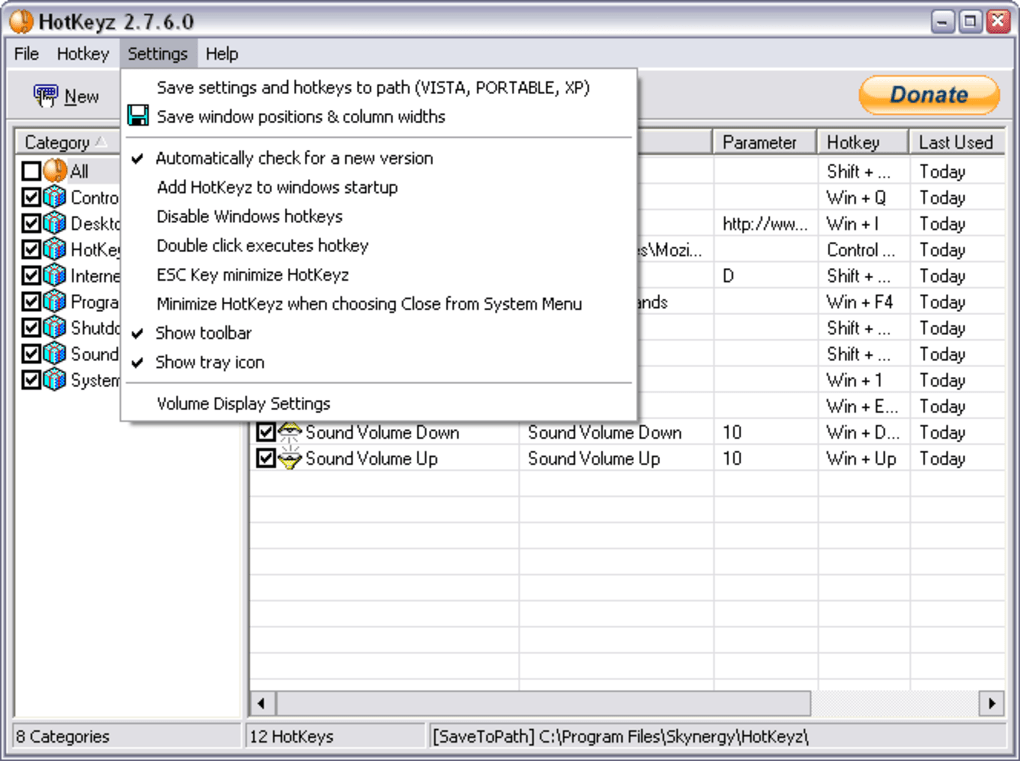
- Tray Icon Customization: Choose to display all hotkeys in the system tray menu for quick access and visibility.
- Pre-User Name Behavior: Automatically tab through login fields before executing a login hotkey, useful for websites with multi-field login forms.
- Date Mask Support: Use date formatting like [DATE_D MON CCYY] to insert formatted dates into text via paste commands.
These features allow users to automate routine tasks, reduce mouse dependency, and accelerate workflow execution. For example, a developer can assign a single shortcut to open their IDE, load a project, and start a server. A content creator might use a macro to insert a timestamped note into a document with a single key combination.
User Interface, Workflow & Performance
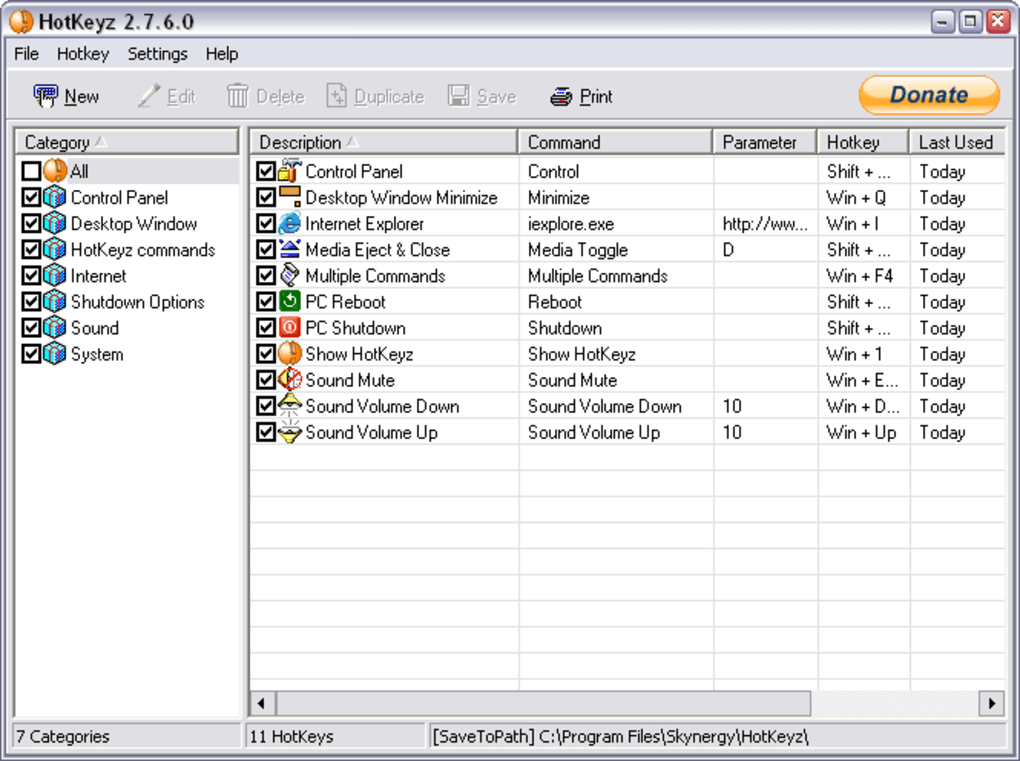
Hotkeyz features a clean, two-pane interface: one side displays a list of categories, while the other shows the corresponding shortcuts within each group. This layout promotes intuitive navigation and quick access to frequently used commands. The design prioritizes functionality over visual flair, making it easy to focus on task management.
Navigation is straightforward—users can expand categories, add new shortcuts, or modify existing ones with minimal clicks. The workflow is optimized for efficiency, especially when setting up complex macros or organizing large sets of hotkeys. The software runs continuously in the background, requiring no constant user interaction once configured.
Performance details were not specified. However, the developer notes that the application uses minimal system resources. The software’s lightweight footprint suggests stable operation even on older or low-spec machines. No reported crashes or instability have been documented. General performance observations are based on typical behavior of similar utilities, with no significant impact on CPU or RAM usage expected.
Compatibility & System Requirements
Hotkeyz is designed for Windows operating systems. The current version, 1.1.0, has a file size of 4.1 MB, indicating a compact and efficient installation. The developer did not provide additional system requirements.
Compatibility information is limited to the Windows platform. No details were shared about specific Windows versions or hardware specifications. Exact system requirements were not listed. Users should ensure their system supports standard desktop applications and background processes.
Pros and Cons
Pros
- Free to use with no licensing restrictions
- Lightweight with minimal system resource usage
- Supports custom categories and user-defined shortcuts
- Advanced macro recording with playback speed control
- Auto-save feature prevents data loss
- Enhanced login automation with pre-user name tabbing
- Flexible date formatting in paste commands
Cons
- Only available for Windows platforms
- No official documentation or tutorial guide provided
- Interface may feel basic to users expecting modern design
- Macro editing requires specific workflow steps
- Auto-save does not function when editing hotkeys
FAQ Section
Is Hotkeyz compatible with all Windows versions?
Hotkeyz is designed for Windows, but specific version compatibility was not detailed by the developer.
Is the software safe to download and use?
Hotkeyz is a free desktop utility developed by SoftPas. No malicious behavior has been reported, and the software operates within standard Windows permissions.
How often does Hotkeyz update?
Updates are released periodically, with the latest version (1.1.0) published on May 25, 2024. The update history includes new features and bug fixes.
Can I use Hotkeyz offline?
Yes, Hotkeyz functions entirely offline. No internet connection is required after installation.
What type of license does Hotkeyz use?
Hotkeyz is distributed as free software with no restrictions on use, modification, or distribution.
Final Thoughts + CTA
Hotkeyz delivers a powerful yet simple solution for users aiming to boost productivity through keyboard automation. Its ability to manage custom shortcuts, record macros, and streamline repetitive tasks makes it a valuable tool for professionals and power users. The lightweight design and minimal resource footprint ensure it runs smoothly without affecting system performance.
While the interface is functional rather than flashy, its efficiency and feature set outweigh its visual simplicity. The addition of auto-save, macro editing, and login automation adds significant value for advanced users.
For anyone serious about minimizing mouse dependency and maximizing workflow speed on Windows, Hotkeyz is a must-try utility. Download Hotkeyz now.







